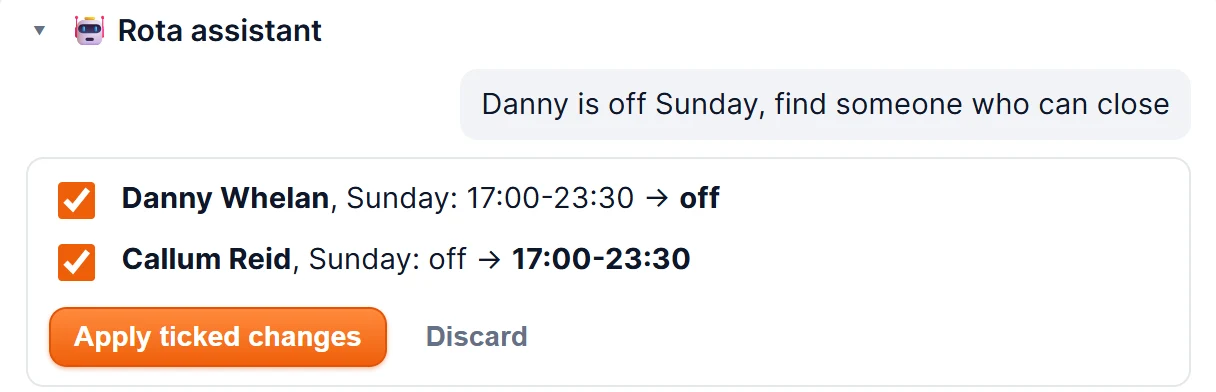
Someone's off, someone wants mornings, Saturday needs a closer. Type it the way you'd say it, and FireAttend shows you exactly which shifts would change. Nothing moves until you approve it.
It sits on the Rota screen, next to the week you're editing.
Type the change in plain English — "Ben is off Saturday, find someone who can close", or "give Ana mornings Monday to Friday". If it isn't sure what you mean, it asks you one short question instead of guessing.
You get a preview of every shift that would change, and only those. Each one has been through the same checks as a change you make by hand: inside your trading hours, nobody rostered at two shops at once, and anyone outside the availability they gave you flagged.
Tick the changes you want and apply them. It only ever edits the draft, so your staff see nothing until you publish the week — the same as any other edit.
The small changes that eat a Thursday afternoon, one message each.
"Sam can't do Sunday — who can cover?" It looks for someone free that day who has the right role and isn't already working, preferring the people you've ranked first.
"Swap Priya and Tom on Thursday." It changes both people's Thursday, and you see both before either changes.
"Put Leo on evenings Friday and Saturday." Mornings and evenings mean your shop's own shift times, not a guess.
The rota assistant uses Anthropic's Claude. Only if a shop switches it on: that shop's rota for the week being edited — staff names, roles, scheduling priority, availability and shift times — is sent to Anthropic, in the United States, at the moment a manager asks it something. Never your pay records, contact details or attendance data. Switch it off and nothing more is sent.
That's the wording of our Data Processing Agreement, Annex 3, which names every company that handles your data and what each one sees. Anthropic's API terms provide that inputs sent through it are not used to train their models. More on how we look after staff data on Security & data.
No. It's included with FireAttend — £6 a week per shop, however many staff you employ, with a 60-day free trial.
No. It shows you the shifts it would change, and nothing changes until a manager ticks them and applies them. Even then it only edits the draft; staff see the week when you publish it.
No. Auto-build places people by fixed rules, from the availability they gave you and the style you choose in Store settings. The rota assistant is the AI part, and it edits a rota rather than building one.
Only if your shop switches it on, and only when a manager asks it something: that shop's rota for the week being edited — staff names, roles, scheduling priority, availability and shift times. Never pay records, contact details or attendance data. It's in our Data Processing Agreement, Annex 3.
Anthropic's API terms provide that inputs sent through it are not used to train their models, and we don't use your data to train anything either.
In Store settings, shop by shop. Switching it on or off is recorded in your activity log, and it's off for every shop until you do.
60 days free, then £6 a week per shop, however many staff you employ.
Start your free trial See everything in FireAttend